Did you know that businesses that use a CRM system can increase their productivity by up to 29%? If you run a company aiming to streamline your sales workflow, client management and supercharge your business growth, you’re in the right place! In today’s competitive tech-landscape, choosing the right Customer Relationship Management (CRM) software is more crucial than ever. Let’s explore some of the best CRM for consultants and small businesses in 2024.
Table of Contents
Why do you need a CRM
- Centralized customer information
- Improved customer relationships
- Enhanced sales efficiency
- Data-Driven decision making
- Better Team collaboration
When we first started our tech consultant business, I thought we could keep track of our prospects, leads, and communication with potential life-long customers with Microsoft Excel while juggling the internal team communication in Microsoft Teams. Big mistake! It didn’t take long before we missed reconnecting to highly valuable leads, missed who should contact which customer, forgot client details, had a hard time knowing the value of our sales pipeline when our investors asked, and honestly, with hindsight, looked a bit unprofessional. That’s when we realized we needed to find a system and hopefully the best CRM system for consultants out there.
As many other business we juggle multiple clients and projects simultaneously and the prospect and lead process could be a long story that spans over months until a deal is closed. We need features tailored to our workflow—like tracking tools integrated into the client profiles. That way, I can see all the tasks, deadlines, and communications in one spot, and be reminded when next action should be taken.
I’ve had previous experience from Microsoft Dynamics 365 and all our teams did really struggle with quick and easy adaptation for our needs. It was too corporate and too big to handle, and every little tweak would lead to high consultant fees for implementation. With that said we started to look for alternative CRM systems that offered easy customization, that you could do without paying extra for. Being able to tweak the system to match our ways of working made a huge difference. I set up custom fields for client preferences, prospect stages. It felt like the CRM was built just for me.
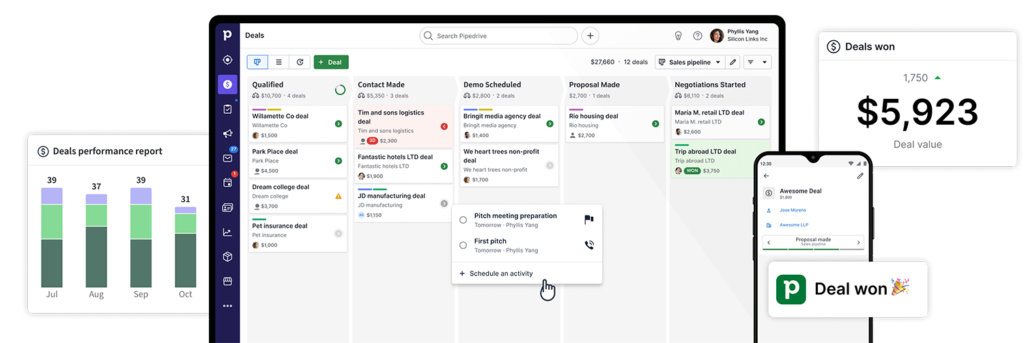
Another thing that helped was finding a CRM with strong analytics. I started tracking which services were most profitable, how many sales activities we had per person, team and month. This insight helped me focus my efforts where it really mattered. Plus, it was kind of fun seeing the numbers go up as we made adjustments.
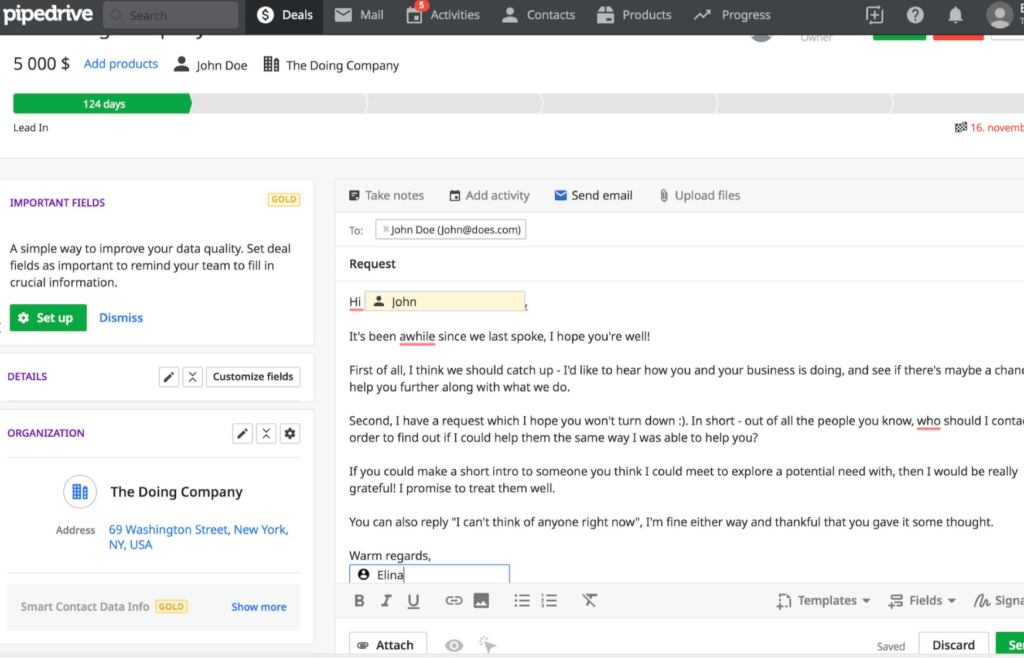
Having a CRM that syncs with my email and calendar was a lifesaver. No more flipping between apps or missing important meetings. Everything updates in real-time, so I’m always on top of things. It’s like having a personal assistant who never takes a day off.
Now, I’ll admit, I was a bit hesitant at first. Implementing a new system seemed daunting. But most specialized CRMs for consultants are pretty user-friendly. And the time I invested in setting it up paid off big time. My clients noticed the difference too—they appreciated the quicker responses and organized approach. We never dropped valuable information about our clients, as everything was stored in one place/contact.
Oh, and if you’re worried about cost, think of it as an investment. The efficiency and professionalism you gain can actually bring in more business while fostering a good team spirit and collaboration. We started with 2 seats and could easily add more when needed, without having to pay for a big enterprise deal from the start. With that said, the best CRM for consultants or small businesses doesn’t have to break the bank, as you pay what you use for. And don’t be afraid if you’re a bigger corporation either, as the scalable options still are there. There are plenty of options out there to fit different budgets and needs.
In hindsight, I wish I’d made the switch sooner. The peace of mind alone is worth it. So if you’re still managing your consulting business with spreadsheets, maybe it’s time to consider a real CRM system. Trust me, your future self will thank you.
Key Features to Look for in a CRM system
When I was searching for the best CRM for consultants, I felt like I was drowning in options. There are so many out there, and not all of them are cut out for what we need. After sifting through a bunch—trying some trials along the way—I figured out some key features that are absolute must-haves for consultants like us.
First off, customization is huge. As said before, some systems are very rigid and almost nothing can be tweaked without external help. Look for a CRM that lets you customize fields, dashboards, and reports. Being able to tailor the system to your specific needs makes a world of difference.
Integration capabilities are another biggie. All companies today, small or huge, juggle a ton of tools—email, calendars, accounting software, you name it. The CRM should play nice with the tools you already use. I found one that synced seamlessly with Microsoft Outlook that makes e-mail sending and tracking a dream. It saved me so much time.
Mobile accessibility is something I didn’t think I’d care about until I was on the road and needed to access client info. Trust me, having a cloud-based CRM with a solid mobile app is a lifesaver. I once closed a deal while waiting for a flight, all because I had everything I needed right on my phone. You can see on a map if you have any nearby connections in your CRM system.
Analytics and reporting are essential too. I used to make decisions based on gut feeling, which isn’t always the smartest move. With customizable reporting, I could track KPIs like client acquisition cost, project profitability, and study if there are any clues in why we lost deals. Having that data helped me make informed decisions to grow our business.
Don’t overlook the importance of good customer support and training resources. When you start out you will have questions. Having access to webinars, tutorials, and responsive customer service made the learning curve a lot less steep. It’s something you’ll appreciate more than you might think. A good customer service will help you do the set-up without paying extra.
Security features are crucial as well. We’re dealing with sensitive client information, so the CRM needs robust security measures. Look for things like data encryption and two-factor authentication. You don’t want to risk a data breach—it could ruin your reputation.
Scalability is something to keep in mind. When I began, I was a one-person show, but I had plans to expand. Choosing a CRM that could grow with my business saved me the hassle of switching systems later on. Make sure the CRM can handle more clients, additional team members, as you scale up.
Lastly, consider the user interface and ease of use. If the CRM is clunky or complicated, you’re less likely to use it effectively. Some CRM systems tend to have too much features that the UI is very confusing, I ended up going back to spreadsheets for a while. A clean, intuitive interface can make your daily operations smoother.
So, when you’re on the hunt for the best CRM for consultants, keep these key features in mind. It’ll save you time, money, and a lot of frustration in the long run. Trust me, finding the right CRM for your business can take your business to the next level.
Top 3 Best CRM for Consultants in 2024
1. Pipedrive
Pipedrive is a popular CRM system that started in 2010. It now has >100.000 paying organizations/companies worldwide. Pipedrive has been experiencing consistent growth, particularly among small to medium-sized businesses (SMBs) seeking user-friendly and cost-effective CRM solutions. This is my personal favourite and I would say it is one of the best CRM for consultants out there.
Features
- CRM system with advanced client management
- Sales software and Kanban pipeline
- Activity scheduling and automation
- Calendar and mail-integrations
- Reporting and analytics
- Easy understandable customization, without the need for external help.
- Superb customer support included in plan
Integration
Pricing
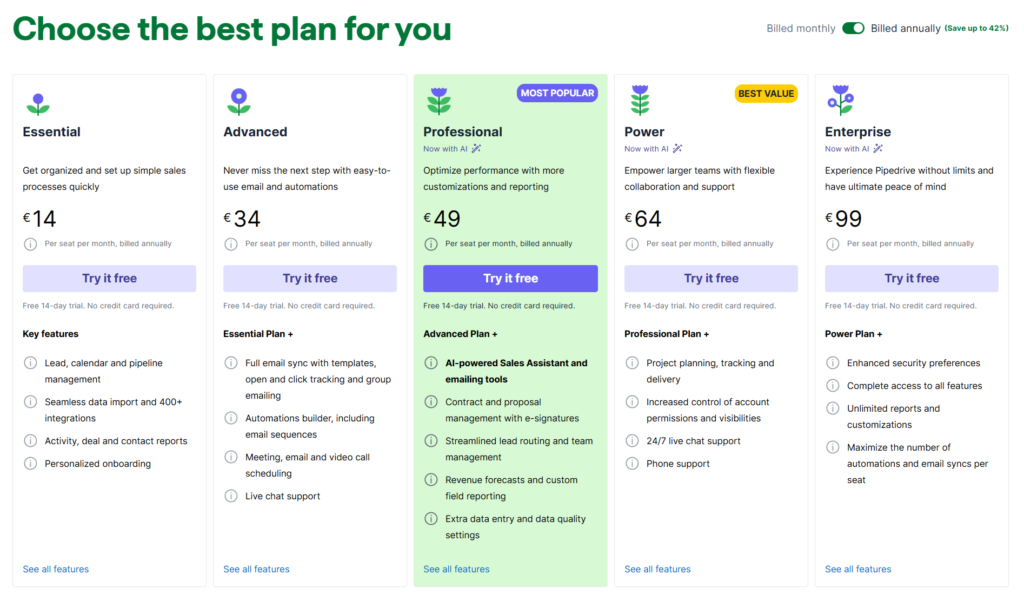
Trial period
14 days free
Pros and cons
Pros +
- User-Friendly Interface: Offers an intuitive and visual sales pipeline that’s easy to navigate.
- Affordable Pricing: Competitive pricing plans suitable for small to medium-sized businesses.
- Customization: Allows for customizable pipelines and fields to tailor the CRM to specific needs.
- Activity-Based Selling: Focuses on scheduling and tracking activities to keep sales organized.
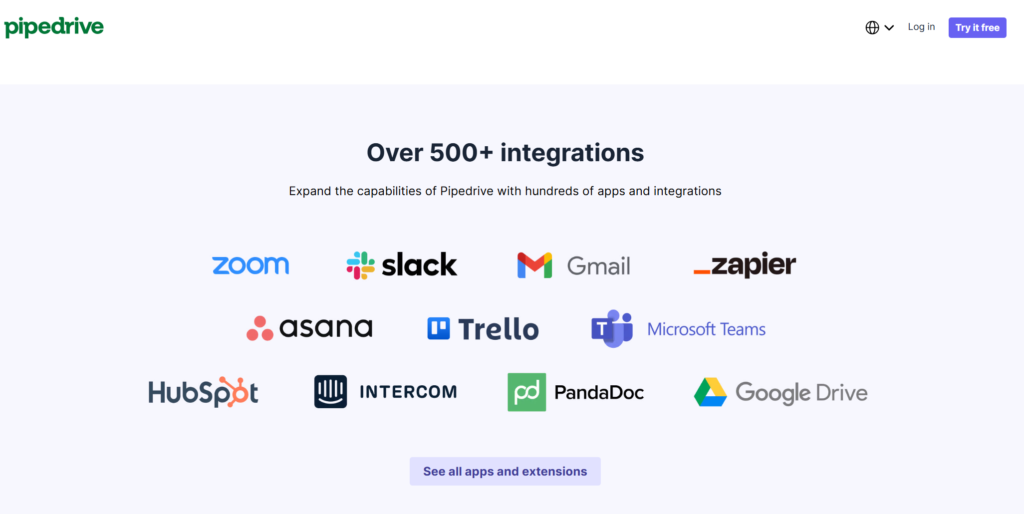
- Integrations: Supports integrations with almost all needed third-party apps.
- Improvements: Pipedrive is continously improving the software and rolling out new features, without extra cost
Cons –
- Limited Advanced Marketing: Lacks focus on marketing solutions, as e.g. Hubspot.
- Basic Reporting: Analytics and reporting features are not as robust as some competitors.
- No free version: Unlike some competitors, does not offer a free version of the software up to x number of contacts.
2. Hubspot
Originally known for inbound marketing tools, HubSpot has now expanded into the CRM world. The platform continues to be popular among Small and Midsize Businesses due to its integrated approach to marketing, sales, and customer service.
Features
- Marketing tools
- CRM Database
- Dashboard
- Task management
- E-mail integrations
- Reporting and analytics
Pricing
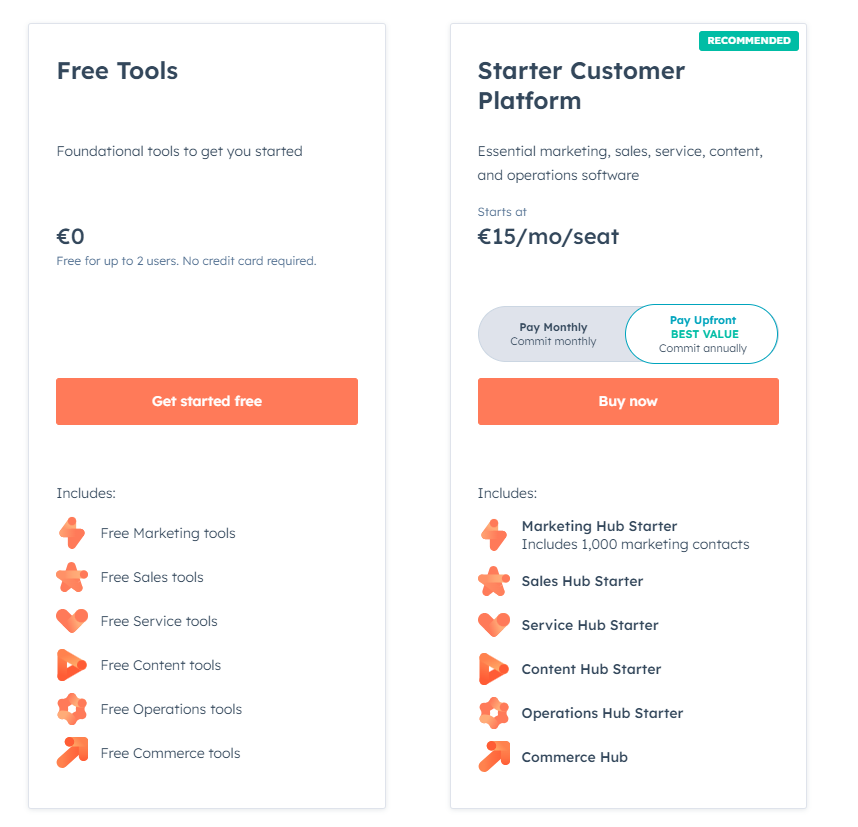
Trial period
14 days free
Pros and cons
Pros +
- All-in-One Solution: Combines CRM with marketing, sales, and customer service tools.
- Free CRM Version: Offers a free version for small businesses starting out with up to 1000 contacts.
- Strong Marketing Tools: Excellent for inbound marketing, with features like email campaigns and content management.
Cons –
- Complex pricing structures: Hubspot has many different bundles, and modules and it is hard to get an overall picture of what it will cost you in the end.
- Some Features Are Costly: Advanced functionalities require upgrading to expensive plans.
- Customization Limitations: Less flexibility in customizing compared to some other CRMs.
- Feature Gaps in Free Tier: The free version lacks advanced features needed as businesses grow.
- Data Limits: Restrictions on contacts and data storage may require additional purchases.
- Integration Costs: Some integrations may require additional fees or third-party tools.
3. Salesforce
Salesforce is the world’s leading CRM platform with over 150,000 customers
Features
- Contact management
- Report, dashboards and analytics
- Automations & workflows
- Sales process
- E-mail marketing
Pricing
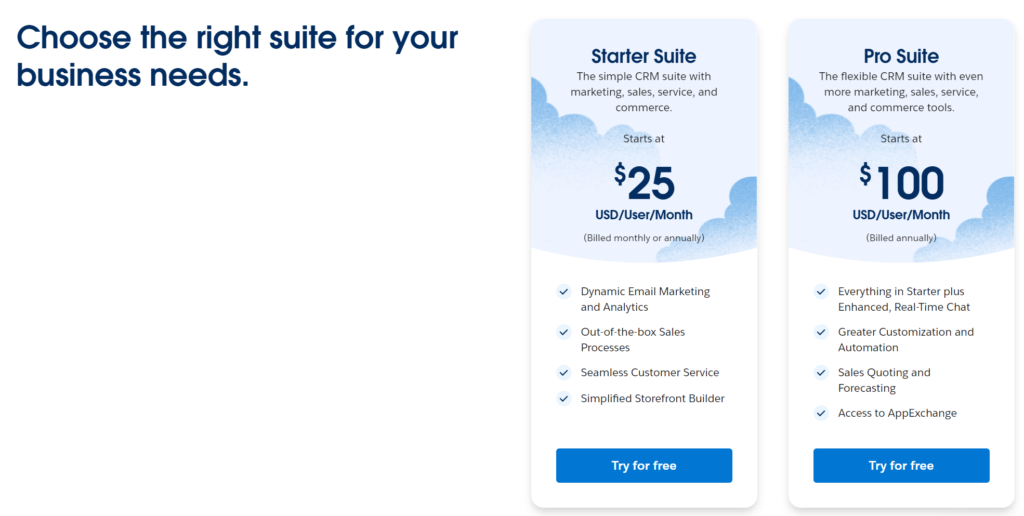
Trial period
30 days free
Pros and cons
Pros +
- Comprehensive Features: Extensive tools covering sales, service, marketing, and analytics.
- Highly Customizable: Can be tailored extensively to fit complex business processes.
- Scalable Solution: Suitable for businesses of all sizes, from individual consultants to large enterprises.
- Strong Integration Ecosystem: Access to a wide range of apps through the AppExchange marketplace.
- Advanced Analytics: Offers in-depth reporting and forecasting tools for data-driven decisions.
Cons –
- High Cost: Subscription fees and add-ons can be expensive for small businesses.
- Steep Learning Curve: Complexity may require significant time and training to master.
- Requires Technical Expertise: Customizations often need skilled developers or consultants.
- Overwhelming for Simple Needs: May not be the best CRM for consultants with straightforward requirements.
- Additional Costs for Support: Premium customer support comes at an extra charge.
How to Choose the Right CRM for Your Business
- Identify your specific needs and objectives
- Evaluate user interface and ease of use
- Look into customer support and training resources offered
- Utilize free trials or demos to test functionalities
You know, choosing the right CRM for your business can feel like navigating a maze. I’ve been there, scratching my head over endless options, each claiming to be the best CRM for consultants like us. Let me share how I finally figured it out.
First tip: Identify your specific needs. Make a list of must-have features. For me, seamless integration with my email and calendar was non-negotiable. I needed a CRM that could sync with Gmail and Google Calendar so I wouldn’t miss any client meetings or follow-ups. Without this, important tasks were slipping through the cracks.
Next, evaluate the user interface and ease of use. The first CRM I tried was so complicated, I spent more time figuring out how to use it than actually managing my clients. Look for a CRM with an intuitive design. Trust me, you don’t want to waste hours on tutorials when you could be growing your business.
Lastly, take advantage of free trials or demos. I can’t stress this enough. I almost settled on a CRM that seemed perfect on paper but felt clunky when I actually used it. Testing it out first saved me from making an expensive mistake.
Remember, the best CRM for consultants is the one that fits your unique needs like a glove. Take your time, do your homework, and you’ll make the right choice.
Conclusion:
In conclusion, selecting the best CRM for consultants and your business can be a transformative step. It not only streamlines your operations but also strengthens your client relationships, setting you up for long-term success. Remember, the right tools today can make a significant difference tomorrow.